
Introduction
My original plan for the level was an area with items the player could pick up and look at from all angles. I then improved the idea by deciding to add puzzles and object interaction to the level, the intention behind this is to make it more enjoyable and interactive. I believe that this concept would help teach me a new set of skills that build upon my current knowledge and skillset and also helps me branch out and have a little more diversity and versatility in my skills.
I later expanded my idea further by choosing to make the game something of a virtual reality escape room with multiple subtle and branching steps that all converge in the end. I did this so that the player would be encouraged to explore and pick up items and inspect them whilst slowly discovering all of the puzzles and interactions. For this reason I chose that I would leave very few or no obvious clues and rely on contextual and environmental clues instead.
Early Design
Before I started to make anything, I first had to use my initial design idea and refine it enough, that I could then build upon it later down the line. To do this I first started to think about what the environment would be as I had a few ideas and I had not fully decided which one I intended to use yet. Some of my ideas included a surgery room or hospital in which the player is doing surgery on a patient or a mechanic shop that has the player fix cars or even an ancient temple that makes the player solve puzzles for the treasure inside.
I eventually landed on the idea of a Generator/Engine room in a spaceship that was damaged either by a fight or an asteroid collision as I liked the story idea of fixing the machine so that you aren’t stranded in space. Working on this I thought about some of the things that would be used to fix an engine such as what tools would be used or what parts may need to be replaced. I also had to consider the different rooms I wanted and what would be in each.
I first thought about an early room layout and used it to start to think of the sequence of events that could unlock the other rooms, I originally thought to make the scene very linear and doors would open as the player fixed the generator which unlocked new puzzles.
After thinking of a basic room layout I thought of the tools that would be used, I decided that it would have a simple set of tools as to not over complicate things, these tools were screwdrivers, wrenches and pliers as they are versatile and could likely be used no matter what puzzles I added later on.
I decided that I would not fully design all of the puzzles yet as I first wanted to get an idea of what is possible and how I could make things work before coming up with ideas that may turn out to be impossible.
Then I started to test some of the VR capabilities so that I could start to think of puzzle ideas. The first thing that I did when creating a level was to add the VR system, I did this with help from one of our tutors and added the meta quest interaction and then started to play around with the different features that can be added such as teleportation movement and the grabbing and distance grabbing interactions. I took time to test the features in order to see what I could use in my final level and what may be less useful for me. My next step was to figure out how the object interaction would work and how different it was, compared to regular unity interaction. Luckily, it is still very similar and I found most of it fairly intuitive, and started to design and create a simple plan for things in the level, such as what would interact with each other and how that would affect other objects.
Early creation
When starting to create my scene I first started to create what I planned to be the main focus and interactor of the scene. To do this I added a simple cube and deformed it to be shorter and then added several other cubes and altered the size to create something that looked somewhat like a generator or machine.
After having the simple shape of the interactor I then added some asset packs that fit the theme of the level I was trying to create. These ended up being tools and storage packs as I planned on having an engine/machine room. With the assets added I used some of the tools and made them grabbable and movable and started to work on functions for them. My first idea was to have them collide with the main interactor and it would slowly build up the machine and fix it. To do this I created a script to hold all of the important values for the level, and a second script that would interact with the values script, to check if previous steps were complete in order to allow the later steps.
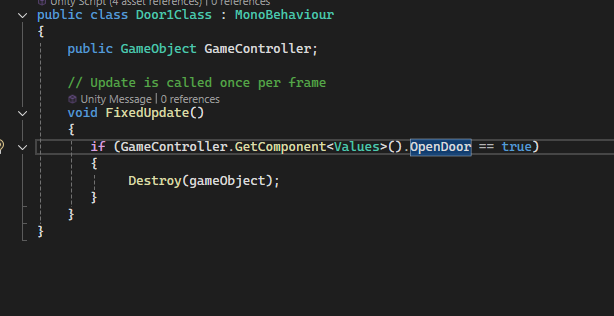
I then changed the teleporting method from predetermined teleport locations to the entire floor mesh and added some simple walls that blocked teleportation plus a door that would open when all of the tools were used on the machine and it was completed.
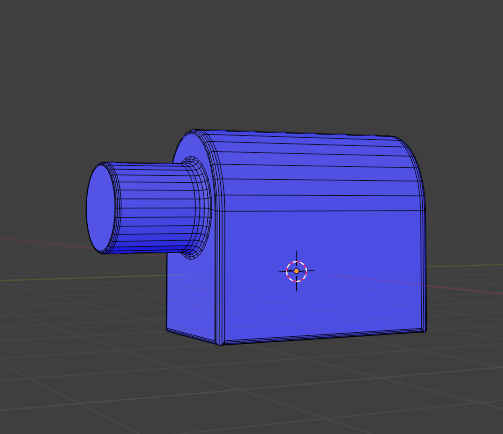
After having some simple function and direction to move in, I started to create a model for what I wanted the final design of the machine would be. For this I looked at a generator and large ship engines to come up with a general shape and then started to model the part that I did not think I could create with the simple shapes in Unity. To develop this part I combined a cylinder and cube to create a rounded box and then extruded a cylinder out of it, on the side to create a socket for a shaft to fit in. Then I bevelled all of the edges to round all of the corners for a more refined and softer overall shape, and exported the model into my unity project.
With the generator piece modelled I placed it in the scene, and positioned it in the place I felt that it fit, and I then replaced the blocky main machine piece with a long cylinder to fit in the socket of the modelled piece. I kept the other machine pieces even though they did not fit because they acted as temporary indicators of the scripts working properly.
With the general generator shape I started to think of puzzles that I could create that make sense as a step of fixing a generator. The first idea I came up with was turning the power off as you cannot fix running machines. To do this I first found an asset pack that was a key and lock prefab. I used an asset pack instead of making the assets as I was not confident enough in my modelling skills to create a key and lock that would fit together as well as those found as a set.
When I found the assets that I would use I started to create the scripts that would turn off the power and be the first step in the level. I did this by destroying the moveable key on collision with the lock and replacing it with a static key that is positioned in the correct location and set the power off value on the GameController to true. Using this value helps to create later steps by checking if previous steps are done.
Changes and improvements
At this point in the process I started to make some big changes as I started to improve and refine my idea. The first major change that I added was with the interaction of the machine. I felt that it would be better to have each component interact with the correct part, rather than with the generator as a whole. The first part I did this with was a pipe model that I made to connect to the end of the generator. I added a small cylinder at the end of the generator and created a new interaction script that is separate from the original interaction, but still references and edits the values script, as I still planned for the values script to be the CenterPoint.
I ended up making three different pipe models, however, I only used two. I had a solid one that was just the shape of the pipe and a hollow one with open ends. I did this as I originally started with the solid pipe and then, when trying to create the moveable pipe that the player could inspect, I realized that as part of being able(to look around and inspect the object it would have to at least seem to work properly. So I created a hollowed out pipe and replaced the one that the player could move. However, I did not change the stationary one as I felt that it was unnecessary, as it should not be able to be moved and inspected as closely.
After adding the pipe, I decided to improve the first step by changing the box with the power switch to have screws on each corner that the player must unscrew before opening the box. I did this by creating a script on the door that makes it grabbable when four values are set to true, and then made four scripts that each changed one of the values when the associated screw collides with the correct screwdriver, and I also added a check on the power script that makes sure that the door is removed before the key can be placed.
I then edited the generator model to have a hole inside that would have a removable door and contain some kind of puzzle that I was not certain of yet. And before I decided what the internal puzzle would be I came up with the idea to add some mechanical parts to the outside of the generator that would move when the generator is fixed, to be a clear indicator.
What I decided to do for this was create four cylinders of dark metallic on the main shaft of the machine, and then duplicated and rotated them slightly, altering the colour of the duplicates to a copper colour so that they contrast the dark metal parts and would clearly show them spinning when the power is turned on. I then added four hollow cylinders that are the same dark metal colour and size to one of the side rooms and created a script for placing them.
The original way I did this was by requiring the spinners to be placed in a specific order and the later ones check for the previous ones with connected GameObjects. I did not think of a better way to do this until later in the process.
Next is when I settled on what the final room would be used for. I decided to turn the final room into somewhat of a secondary engine room that would have more puzzles and interactions in a different place to prevent the area from being too cramped. In the room, I decided that I would put a fuel tank for the player to fill and started to create a fuel gauge that could light up more as fuel is inserted. This is when I realized that if I am using multiples of the same object it would be simpler to have to collider detect for the tag than a specific GameObject, and have it increase a float value that sets the fuel gauge as active as more is added. This means that they don’t have to place in a specific order to have the desired effect.
I also changed the main generator’s spinner and the pipe placement scripts to be the same as it changes the order issue with the spinner script, and I decided to create a second pipe and similar pipe script for the fuel tank to give off the illusion that the two pipes connect.
At this point I finally decided what I would do with the internals of the generator. For this I started to add cylinders and boxes to give off the appearance that the generator is full of wires, I then coloured the wires red, purple, blue, green, yellow, white and black and then modelled a simple wire spool that I could change the wire colour of. to match the wires inside the generator. I then placed a table next to the door to the generator for the wire spools to be placed on.
I created a static and moveable spool for each wire colour and at first made the interaction point the doorway to the generator internals. I then set the wires as inactive and then when all of the wire spools were placed, and wire cutters were used inside the generator the wires would appear inside the generator. I later changed it so that the wire spools were placed on the table properly, by interacting with the table through having a value for each spool, and then a value on the values script for all the spools being placed, so that the wire cutters can be used on the generator internals when all spools are placed.
The final puzzle/interaction I wanted to add to the scene was a fuse box and a fuse to place inside. This was simple to do as it was almost identical to the placement of the wire spools, but was only one object, rather than multiple to enable the value on the values script.
I decided to add this to the room with the fuel tank as I felt that the room was too empty with only the fuel tank inside as I wanted the room to contrast the primary engine room and keep the main focus on the primary generator.
Refinement and Final additions
In the final stage I thought about some ways I could tie everything together and make some parts more cohesive or refine some aspects that I was not happy with.
The first change I made was to make the secondary engine room and workshop rooms smaller. I chose to do this as I felt that the size that they were previously was unnecessary for what was in the rooms, and their larger size took away from the contrast of the main room, and created empty space for no reason which would also take away from the theme of the environment of the inside of a spaceship.
The next step I took was to clean up all of my code and the interactions as they had become messy due to all of the changes and improvements, I had made without fully updating everything else. To do this I deleted any unused values and code that I marked as a comment in case it may later become useful, as well as cleaning up and improving some things such as the generator pipe only being placeable when the spinners are placed, and the fuel only being useable when the fuel pipe is placed, as well as making sure that all doors must be removed before any interactions behind the door is possible. I then added a defined and clear end point that would give the visual impression of the generator powering on, due to the spinners starting to spin. To do this I created a value that would replace the static power key with a grabbable one and then, when the key exits collision with the lock, a power on value is set as true and the spinners start to spin.
I felt that the start of the game was sudden as it did not have any kind of menus and loaded into the game immediately. Therefore I started to create a start menu that loads before the main game. I had quite a bit of trouble with this as the tutorial documentation provided by Meta was incredibly lacklustre and did not properly explain things. However, I did eventually figure out the recasting system and created a simple menu with start and quit buttons. I then duplicated this scene and changed the play text to play again and added victory text above. I then added the simple code to change scenes when the play buttons are pressed as well as quit the game when the exit buttons are pressed. I then added an enumerator to the values script that would change to the victory screen after a delay. I added a delay to this, rather than having the scene instantly change, so that the player has time to see the generator power on.
Next I asked some friends to playtest my game as I wanted some feedback on my game as a whole, and what changes they thought I should make. They came back with some helpful advice such as finding some issues with the navmesh and teleportation, as well as saying that while all of the puzzles are intentionally difficult and do not have many, if any obvious hints. One step, in particular, had very little guidance even compared to the others, because the others have subtle hints such as for the screws, the screwdriver type matches the screws, as well as bolts matching the wrench size, moveable doors have handles, the fuel is in commonly used fuel cans, and even the spinners internals match the outer size of the generator shaft. The wire spools’ placement was not as obvious and, to fix this, I added a simple clue to the shelf that they are placed on in the form of squares on the shelf that match the color and position of the spools. I felt that this did not make the step too easy, but did also add a hint that the player can follow.
Scrapped Features
In the process of designing and creating my scene I thought of some ideas that I would have liked to add. However I had to decide against these due to issues such as difficulty to add or the feature causing problems to already existing systems. I believe that if I were to continue this project or redo it I would likely look further into ways to add these features.
The first feature I scrapped was buttons for the player to press and poke interactions. In hindsight, this feature would have been incredibly easy to add as it is a feature that is built into the Meta interaction. However, I scrapped the idea early on and forgot about it until much later, and when I did remember, I had already built the game around object interactions and found ways around using buttons and poke interactions.
The second feature that I scrapped was storage and carrying boxes that would work like a backpack in other games, with the player being able to place items inside of the box and move the box with the items inside, and then when they need the item they could remove it from the box and move both the box and item independently. I scrapped this idea as I could not manage to make it work properly and ran out of ideas on ways that it may work. The placement into the box was incredibly simple to do, by making the box that the item collides with the parent of the item, which means that the box’s movement would also move the item inside.
The removal of the item is what I found to be the difficult part that caused me to scrap the idea, as I tried many different methods and could not find a way to remove the item from having the box as its parent. This then meant that no matter whether the item was removed from the box, it would still move when the box did, which could cause a lot of issues with important items being moved out of the map or inaccessible.
The removal of the item is what I found to be the difficult part that caused me to scrap the idea, as I tried many different methods and could not find a way to remove the item from having the box as its parent. This then meant that no matter whether the item was removed from the box, it would still move when the box did, which could cause a lot of issues with important items being moved out of the map or inaccessible.
The fourth feature I scrapped was an in-game pause menu. I scrapped this for two main reasons. The first React being the difficulty to implement, I did not have any clue how i would even start to make a menu that moves with the player and can be opened and closed at will.
The second main reason I did not add a pause menu was because the Meta Quest 2 already has a built in pause menu that fulfils the uses that I wanted, although in a less convenient way. This is shown with the easy ability to quit a game from this menu but not the easy ability to restart, from what I could see. However this is as simple as quitting and reloading, because the game is short and does not save progress.
The combination of these two main reasons gave me very little motive to try and find a way for this feature to work when I could focus on other features that could have more of an effect.
The fifth scrapped feature was the ability to save and load the game. This was scrapped early on due to my two major issues. The first being my lack of knowledge on how menus worked. This was the lesser of the two issues, as I feel that this would be fairly simple to learn and all it would require is opening a single submenu.
The second issue was the primary reason that I scrapped this idea as I do not even know where to start with storing save data, or know how, to use and open a pause menu to save the data. This caused me to give up on this idea very early on as I also felt that it would be better to not have save data due to the escape room theme which I felt would be better completed all in one go.
The sixth idea I scrapped was hand tracking. While the idea was only briefly considered I thought that it could make the game feel more immersive and involved than with controllers. I decided against this because I thought of it fairly late in the process and would have to change a lot of things to make it work, such as I would likely need to have some form of proper tutorial to teach the mechanics, as the actions are done with hand poses that would be difficult to guess. I felt that having a tutorial would take away from the escape room aspect as, if it had a tutorial it would take away from the original feeling of confusion while the player starts to get their bearings. In this way I liked the controllers as it meant that no tutorial was needed, as there are far fewer possible inputs and the player can quickly figure it out without help.
The seventh idea I decided against is other levels. I scrapped this idea as I thought that with the given time, having more levels would take attention away from the current level, and overall, all of the levels would be a lower quality. If I had more time or continued this in the future I would likely add more levels with different themes and theme related puzzles.
The second to last feature that I scrapped was improved usage of the tools and puzzle pieces. By this I meant having to properly do the motions for the tools such as rotating the wrenches and screwdrivers, as well as opening and closing the wire cutters on wires to cut them. I scrapped this feature as I did not know how to do it for some pieces, as it would differ for each type of tool. While the screwdrivers and wrenches were similar in one respect, in needing to rotate, the wrench would also need to pivot around the bolt and then the wire cutters would need to have separate grab points on each handle that could still move the object as a whole. Overall I just felt that adding these would be too difficult for the relatively minor impact that they would have and decided to scrap the idea.
The final thing I scrapped was less of a full feature but I originally wanted to add more puzzles and a more varied set of puzzles. I scrapped this, because in the environment I had, I could not think of many more puzzle types that would be unique to VR, and just adding more puzzles would get even more repetitive than it already is and take away from the overall experience that I want to create.