
Introduction
The concept I developed for my project is a VR game level created in Unity. This idea is to be set in a small room with desks and items surrounding the player that they may be able to pick up or interact with. With the ability to examine the items around them from all angles, I chose to do this because I liked the idea of creating something that can show off the advantages of VR in a simple and engaging way. I decided to do it in this way because it not only felt like an enjoyable way to use VR- but also it did not seem too difficult to make additional changes to or make improvements.
Plan
I originally had two ideas of what I would do for my project. My first thought was a 360 video sequence of a character running/walking through an exploding spaceship or Jurassic Park-style zoo with creatures breaking out, with the viewer being able to look around at the explosions and carnage developing in their vicinity. My second idea and the one I eventually decided to develop was a VR level in which the player can pick up the objects in the scene and move them around to inspect them. I felt that this would demonstrate the best aspects of VR. with the immersive factor and the ability to be able to actually look at the objects from all angles and complete different puzzles in a series of different areas. For the scene content, I had a few ideas of some different areas that I could add, for example, a lab in the middle of experiments – this could also lead to going further than just examining objects and having the player mixing chemicals or doing other experiments. Another was a spaceship much like the one in my 360 video ideas, however, it would instead be an engine room or machine-like room with tools and mechanical parts floating around. Perhaps the player could be tasked with fixing a broken machine using the tools floating around the room, this could even allow progression across different areas by having some important tools or pieces missing and having them in a different area and needing to be located.
This project will be a challenge because to create this, I have to balance adding enough content for it to be fun and engaging, without overscoping or needing to tone it back. This is why I chose something simple that should be easy to refine and scale up. The biggest challenge is that for this I need to learn a new set of skills. Since I do not have experience in creating a VR level, I will have to learn the entire system for VR interactivity in unity. Although this would not be easy, it would not be impossible. An issue that I did not consider until much later when I was testing the Unity VR system was that it may be challenging to test the VR level and interaction without having access to a VR headset since it cannot be tested in Unity the same way other games can.
Originally I did not know what development plan method I would use as I liked both
Agile Scrum and Waterfall, but due to the lack of access to a VR headset for testing, I will be using a waterfall development plan as it does not require or include constant testing as the agile method does. The waterfall development approach is linear and has a sequential development plan which means you have to complete the project step by step and execute each stage in order.
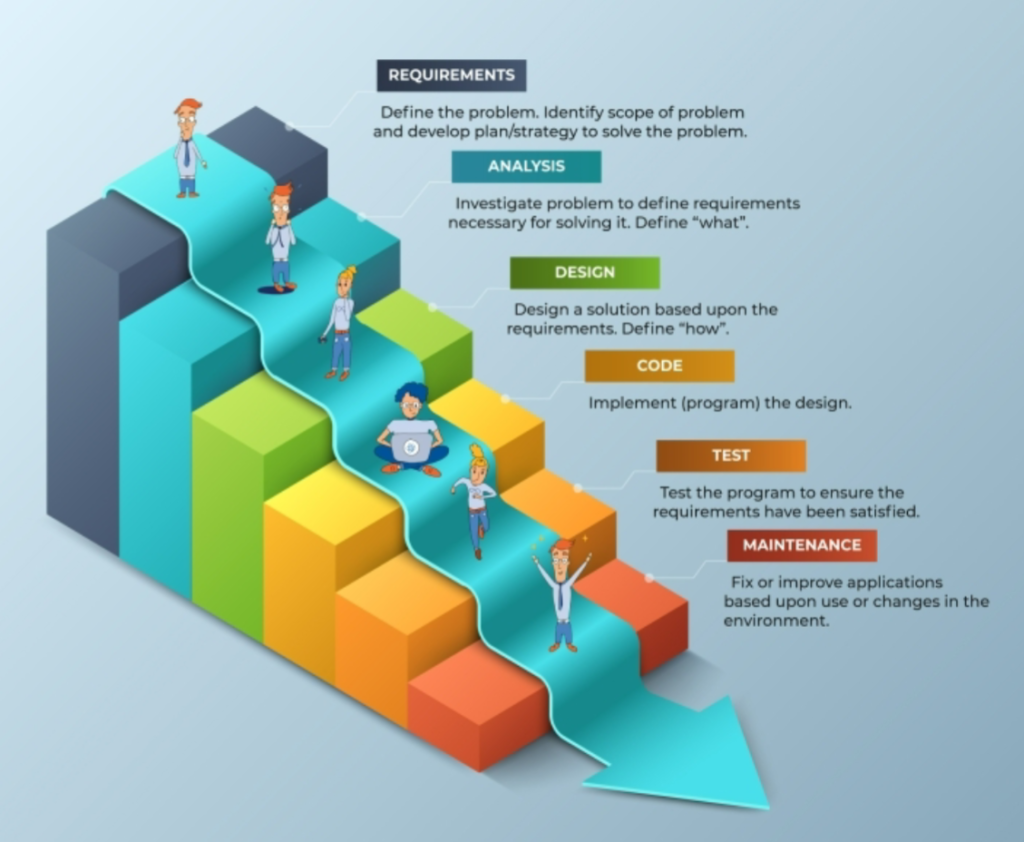
The biggest issue with this development plan for me is that it lacks the flexibility to change things later on, however, to fix this I plan to use a more flexible variation of the waterfall method. In this process, I follow the method strictly at the start to get the core features and gameplay, and then if I’m ahead of schedule or am able to add more. I will simply use the same method again for the extra additions on a smaller scale as I believe that any extra features and additions that I may add with extra time are considered maintenance.
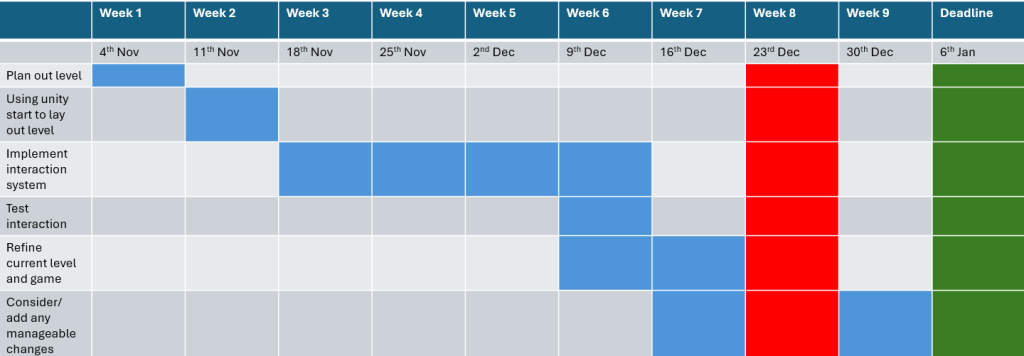
I created a Gantt chart to show my early ideas for my development timeline, with the areas highlighted in blue showing the times for each step. I used green for the deadline and red for showing any time when I am unlikely to able to make any progress due to Christmas.
I then made a second table showing the dates I would like to be done with each stage. With some more defined deadlines and goals for when I wanted some major parts to be completed and to what standard, I wanted them.
| goals | Deadline |
| Start to create a general plan for the level layout, size and content such as objects in the scene, which objects are interactable and how to interact with objects. done using a detailed storyboard and designs for room layout and possibly number of rooms. | Week 1, ending 10th November |
| Create level layout in unity with at least early models of objects in scene and proper placement of objects in the scene | Week 2, ending 18th November |
| Figure out and implement the interaction, grabbing systems and movement/teleportation as well as continue to find and create any needed models and textures. | Week 4, ending on 1st December |
| Test the interacting systems and how they interact with the movement and each other to ensure it is at a level I am happy with as well as fully complete the environment and objects in the scene. | Week 5, ending on 8th December |
| Refine mechanics and gameplay using results of testing to ensure mechanics work smoothly and interact with each other properly as well as add the level features and map interaction. | Week 6, ending on 15th December |
| Work on UI and UX to further refine game such as menus and Hud. | Week 7, ending on 22nd December |
| Test game as whole and make needed improvements | Week 9, ending on 5th January |
| Hand in assignment/ final deadline | 6th Jan |
After I established my broad timeline goals, I began to create a Trello workspace to help me keep track of my tasks and the progress I have made in my tasks. This will help me manage my time and keep me on track with my work. It will additionally help me to avoid doing things that are unnecessary and can even help me arrange my tasks by their importance.
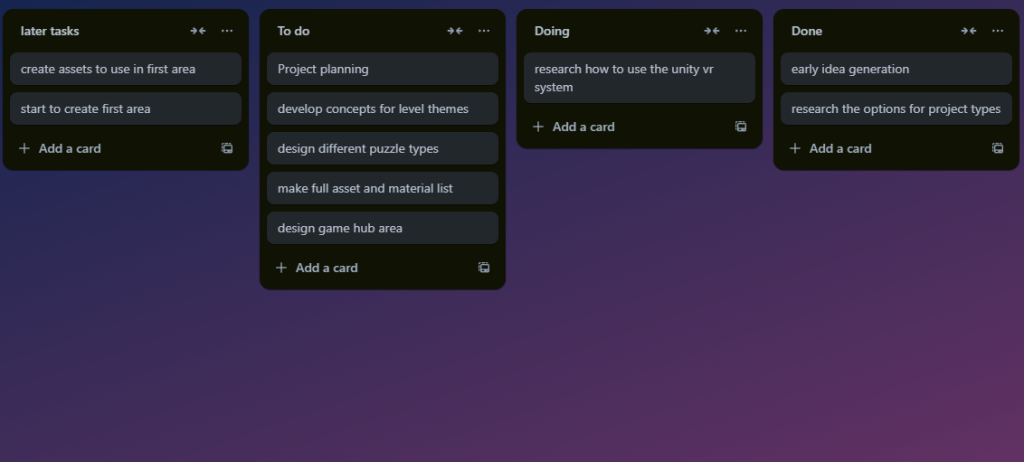
One of the positives of using a Trello workspace is the ability to update and expand my task list. When I complete my current tasks or think of other tasks that I need to complete in the future. Using a Trello workspace also helps me stay on track with my progress, while also having the ability to be more flexible and have multiple active tasks. This works best if I regularly check my Trello board and update my task list so I have to keep that in mind during this project.
On my Trello board I also have two different sections for tasks that I have not started. I did this to separate the idea generation and design tasks from the creation and production tasks. Since the creation and production tasks are to be done much later in the process than the idea generation tasks.
For my project I will be using unity, for the game engine as in the early stages of my research, I discussed it with my tutors they recommended it as the better engine, when working with VR. Following these conversations and my previous choice of unreal, I started to do some of my own research to form my own opinion on which engine would be the better choice. After doing my own research I also came to the same conclusion due to the readymade VR base level, that I can work with and improve upon with features that I want, I will also hopefully be able to gain access to a VR headset to be able to test my work.
I am also expecting be use Fab and the Unity asset store to find models and materials to use in my creation. Since I will not be able to make all of the assets and materials myself in the given timeframe. However, I will be creating some of my own assets using Zbrush, Maya, Substance Painter, and possibly even Photoshop.
Target audience
My VR game level will be primarily targeted towards people that have not had much or indeed any experience in VR. Since I intend to use it as a way to show the possibilities of VR to people who may be unaware of VR and its uses. My goal for this project is to show off some of the best parts of VR to people that may want to try it in a simple and easily accessible way. Keeping my goal in mind, I want to target a more specific audience of teenager to people in their early twenties, as I feel that this demographic is the most likely group to want to try new technology.
project thoughts
For my project I have some important aspects to keep in mind, such as the fact that the user experience and immersion is a very important aspect to consider, when working with VR. Because, if a VR scene is clunky and unintuitive or not immersive the player is much less likely to enjoy the experience and continue to play and explore the later and maybe better parts of the scene. Whereas if a VR scene is done properly and is well fleshed out and at least immersive enough to not ruin the feeling of the scene, then the experience is much more enjoyable for the user.
I also need to keep in mind that the game should be engaging and enjoyable otherwise the player will get easily bored of just picking up items and inspecting them. To solve this I felt that I should add some other engagement or features if I get the chance, such as some kind of puzzle or even just things in the scene that have an extra use like a trash can, where the player can throw objects into. I believe this would make the game more fun and interactive, rather than a boring inspection simulator, which was my very first draft of the idea.
This plan still has some problems. One of the biggest issues that may arise with this project is the previously mentioned lack of or limited access to a VR headset. This is a very large problem, as it makes it pretty much impossible to test my creation for issues, this may cause big issues with my project and lead me to change some of the parts of my project.
Another issue is that I am inexperienced in using Unity for creating things designed for VR, and will force me to learn the skills related to this from scratch. As much as this is an issue for the early stages, I feel that this is a very valuable set of skills to learn as they could be useful in the future.
Similar things that exist
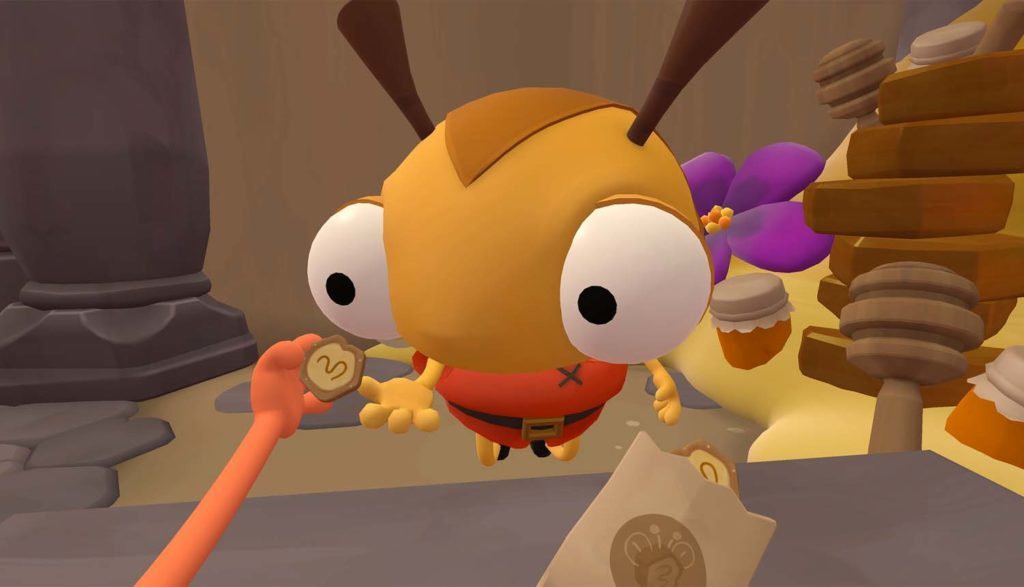
As research to find inspiration for my game, I started to look at VR puzzle games to find any that seemed like what I wanted to create. During my research I found some examples of games that already exist and have a similar concept to what I want to make. Examples like the games I am using as inspiration in the job and vacation simulator games. In the job simulator game the player is put in a set of small rooms in a variety of different situations and job roles, these job roles are an office worker, convenience store clerk, chef, and mechanic. Each job has different tasks for the player to complete that relate to the job they are part of. For example, cooking in the chef role or replacing car parts and fixing cars as a mechanic.
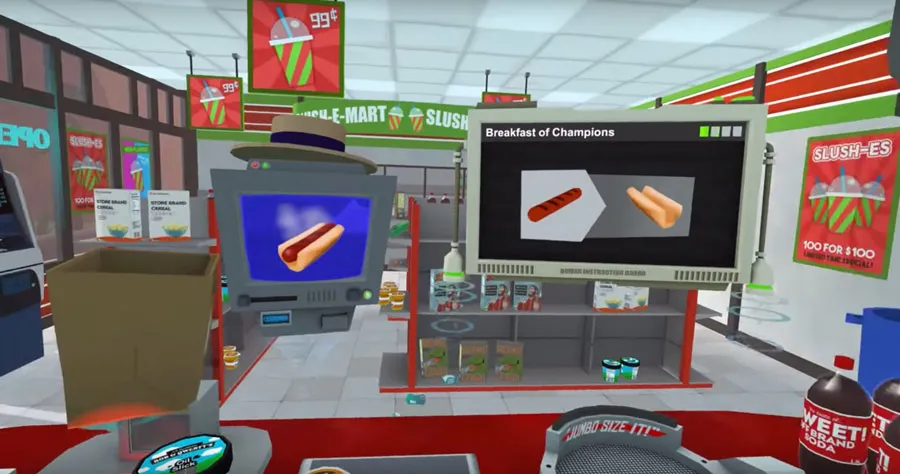
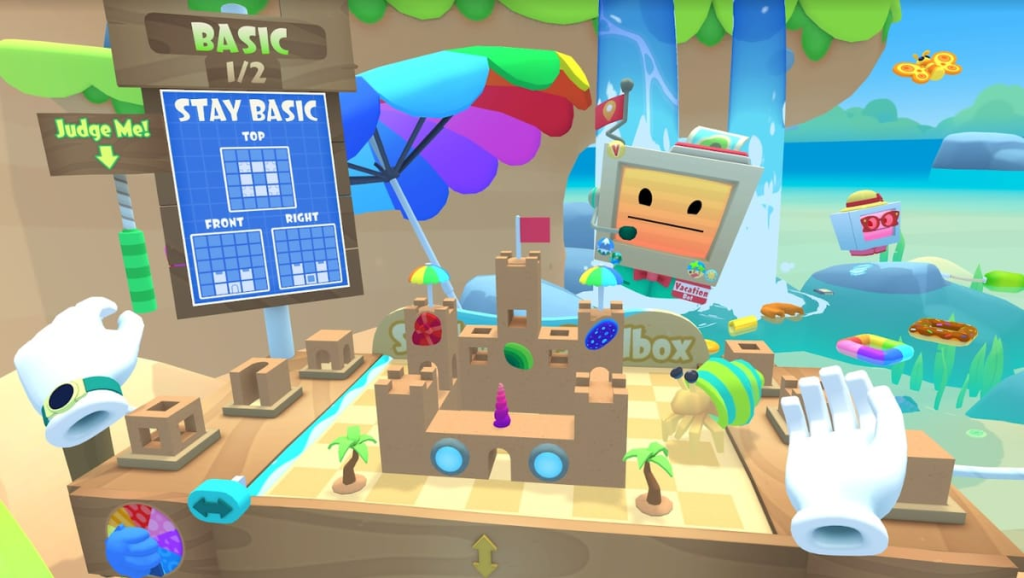
The sequel to job simulator, vacation simulator the player has more movement in the form of being able to teleport around the map and can go around different vacation-themed areas and partake in a variety of different activities. Such as competing in sand castle building competitions and diving to explore underwater wrecks in the beach zone or slingshot target shooting and river fishing in the forest area.
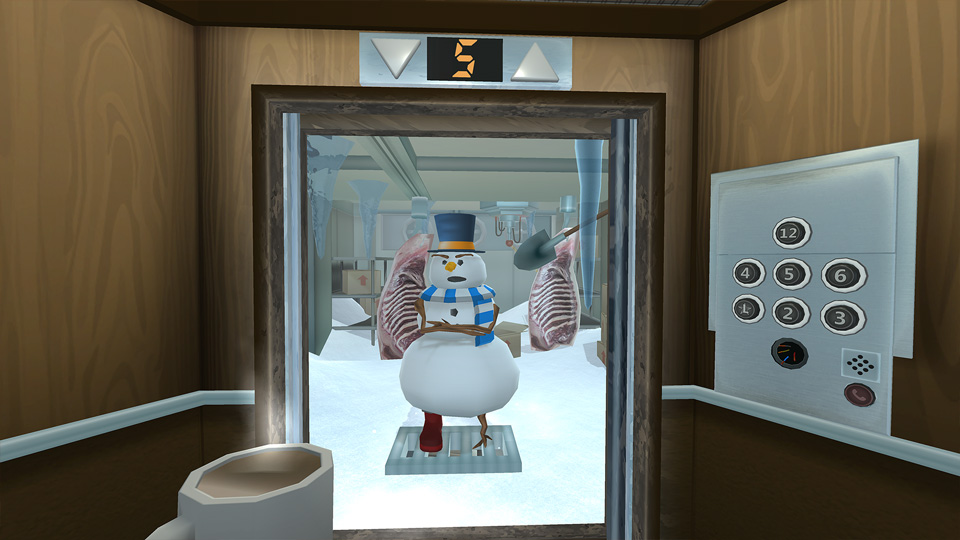
There is another game series that is also very similar to the first concepts of what I intend to create. Which is the floor plan game series with the first of the two being a game that is set in an elevator that moves between different themed floors. Each floor has items that can be interacted with and puzzles that span across different floors, this is incredibly similar to my first draft of the plan, as the player is confined to a small area and has to solve puzzles in the environment around them.
The later concepts that I came up with that include movement and teleporting are more similar to Floor Plan 2, because in the second game the player still uses an elevator to travel between different floors to solve puzzles but, in this one the player can teleport around and have some movement to help in solving the puzzles.
how i can expand upon this
I can expand on my project further by adding more content to the game in the form of extra levels, areas and puzzles and more variety to the things in my game. Such as different types of puzzles and different area themes taking inspiration from the vacation simulator and floorplan with the areas that all have different environments, like the beach, forest and mountain from vacation simulator. Or the floorplan area set in floating sky islands or a volcano. I feel that if I add a similar system to these games with different areas, each with a different theme for the environment that, also influences the style of puzzles in the area the game would be much better. Since having more variety helps prevent the game from going stale and the player losing interest.
I could even expand upon this idea even further by adding unlockable areas that the player gains access to by completing puzzles. In the unlocked areas, the floors could be connected by an overarching goal that is achieved by completing the puzzles in all the areas. This would encourage the player to experience the different environments and unlock the other areas as a way to progress further, whilst maintaining their interest.
References
Mason, W. (2015) Job Simulator’s new level shows just how fun VR can be. Will Mason. Available at: https://www.uploadvr.com/job-simulator-owlchemy-vr-convenience-store/ (Accessed: 31 October 2024).
Feltham, J. (2019) Vacation Simulator Review: A Template For The Future In A Playground For The Present. Available at: https://www.uploadvr.com/vacation-simulator-review/ (Accessed: 31 October 2024).
(2016) Floor Plan Game Page. turbo button. Available at: https://www.turbo-button.com/games/floorplan (Accessed: 31 October 2024).
Asay, P. (2021) Plugged In Pick, Game: Floor Plan 2. Paul Asay. Available at: https://www.pluggedin.com/blog/plugged-in-pick-game-floor-plan-2/ (Accessed: 31 October 2024).